Skip to content

Michal Chmielus Blog

Microsoft Technology Passion Blog

Menu
Menu

How to bind Dynamics 365 with Azure Logic Apps

Posted on 2019-01-042019-01-05 by michalchmielus

If you want to call Dynamics 365 using Web API you have to bind Dynamics 365 with Azure AD Application.

In order to bind Dynamics 365 with Azure Logic App using Azure AD Authentication (OAuth) you need to create Azure AD Application (Application identity) and grant sufficient permissions.

There is already great guideline however covers the topic partially only.

Create Azure AD Application

How to create Azure AD Application you can find here. Let’s create the Application called MyDynamicsApp for reference.

You need to create a Key (secret). Don’t forget to copy the generated secret because it will appear only once you have created and no one will be able to obtain the value again.

Once you have created Azure AD Application you need to grant permissions to Dynamics 365 API by navigating to your recently created Azure AD Application and Required Permissions then click Add button and select Dynamics 365 from the API list.
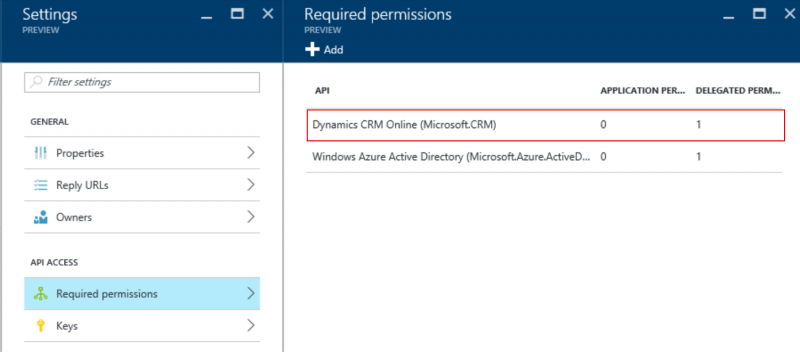
Under DELEGATED PERMISSIONS select permission and Save.

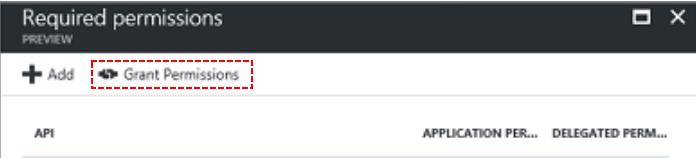
Tip. To skip the consent form while browsing to your Dynamics 365 instance you can click Grant Permissions button which is visible when you navigate to Required Permissions.
Create CRM Technical User

In order to complete binding navigate to Dynamics 365 organization and goto Settings -> Security -> Users click Add user. Ensure the form view is Application User.
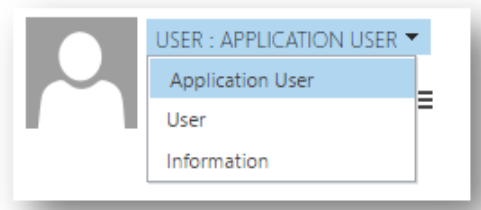
Please note in case your Dynamics 365 instance is set to use Active Directory Federation Service (ADFS) you need to provision a user with onmicrosoft.com domain.

In the Appliction ID gap enter an Application Id of your MyDynamicsApp.

In your Logic App you need to fullfill authentication header by providing following gaps:
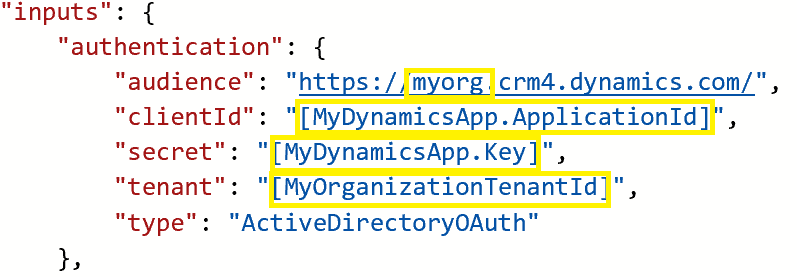
Please mind an audience need to reflect your organization endpoint therefore please navigate to Dynamics 365 settings (Developer resources) to obtain the endpoint.

Leave a Reply Cancel reply

You must be logged in to post a comment.

Recent Posts

  • Unit Testing Dynamics 365 plugin code
  • Bulk load into Dynamics 365
  • Authenticate Azure App Service with Azure AD Security Group

Categories

  • Azure
  • Dynamics 365
  • Integrate Dynamics 365

Ratings

  • Unit Testing Dynamics 365 plugin code 1 vote, average: 5.00 out of 51 vote, average: 5.00 out of 51 vote, average: 5.00 out of 51 vote, average: 5.00 out of 51 vote, average: 5.00 out of 5 (5.00 out of 5)
  • How to bind Dynamics 365 with Azure Logic Apps 1 vote, average: 5.00 out of 51 vote, average: 5.00 out of 51 vote, average: 5.00 out of 51 vote, average: 5.00 out of 51 vote, average: 5.00 out of 5 (5.00 out of 5)
  • Utilize Data Export Service as data replication service in Dynamics 365 1 vote, average: 5.00 out of 51 vote, average: 5.00 out of 51 vote, average: 5.00 out of 51 vote, average: 5.00 out of 51 vote, average: 5.00 out of 5 (5.00 out of 5)
  • Call Dynamics 365 from Azure App Service 0 votes, average: 0.00 out of 50 votes, average: 0.00 out of 50 votes, average: 0.00 out of 50 votes, average: 0.00 out of 50 votes, average: 0.00 out of 5 (0.00 out of 5)
  • Authenticate Azure App Service with Azure AD Security Group 0 votes, average: 0.00 out of 50 votes, average: 0.00 out of 50 votes, average: 0.00 out of 50 votes, average: 0.00 out of 50 votes, average: 0.00 out of 5 (0.00 out of 5)
  • Bulk load into Dynamics 365 0 votes, average: 0.00 out of 50 votes, average: 0.00 out of 50 votes, average: 0.00 out of 50 votes, average: 0.00 out of 50 votes, average: 0.00 out of 5 (0.00 out of 5)
©2026 Michal Chmielus Blog | Built using WordPress and Responsive Blogily theme by Superb